EN
EN

An LED screen can look perfectly smooth to the human eye and still show dark bands, flicker or rolling lines when recorded by a camera. The reason is simple: a camera sensor does not see an LED display in the same way people do. The screen is refreshing through high-speed pulse-width modulation (PWM), while the camera is exposing each frame according to its own frame rate and shutter settings. If those timing cycles do not work well together, visible artifacts can appear in the recorded image.
For most professional LED projects where the display will regularly appear on camera, 3840Hz is a practical starting point. For more demanding broadcast, high-shutter-speed or virtual production applications, 7680Hz is often preferred. However, refresh rate alone does not guarantee a clean camera image. Scan rate, driver IC performance, shutter speed, frame rate and synchronization are also critical.
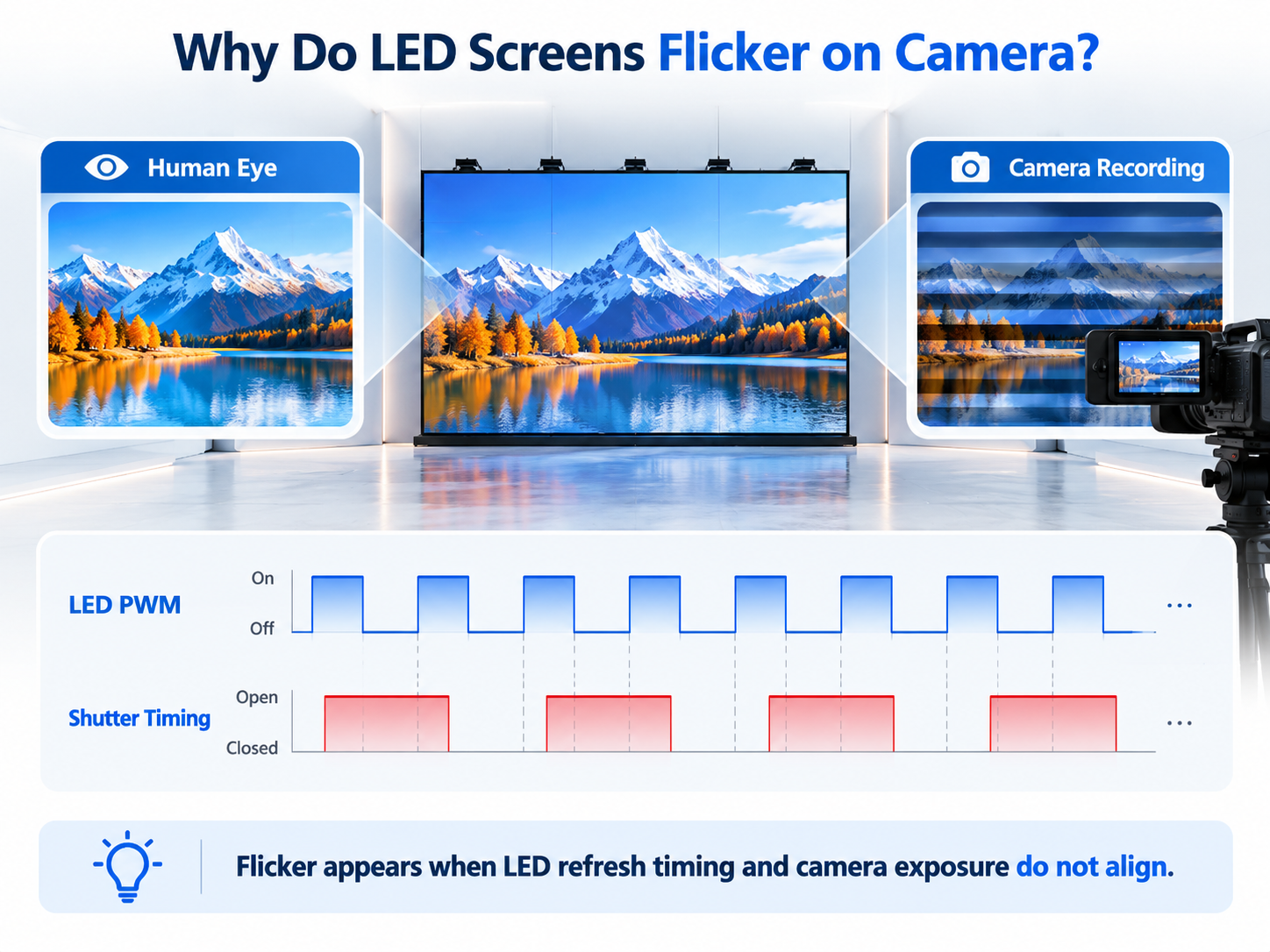
LED displays create brightness by switching LEDs on and off extremely quickly. Human vision blends these cycles into a stable image, but a camera may capture only part of the cycle during an exposure. This can produce horizontal bands, dark lines or uneven brightness. The problem becomes more noticeable when the camera uses a faster shutter speed, when slow-motion footage is recorded, or when the LED processor and camera are not synchronized.
This is why a display that looks excellent in a showroom may behave differently in a broadcast studio or event recording environment. Camera performance should be treated as a system-level specification rather than judged by refresh rate alone.
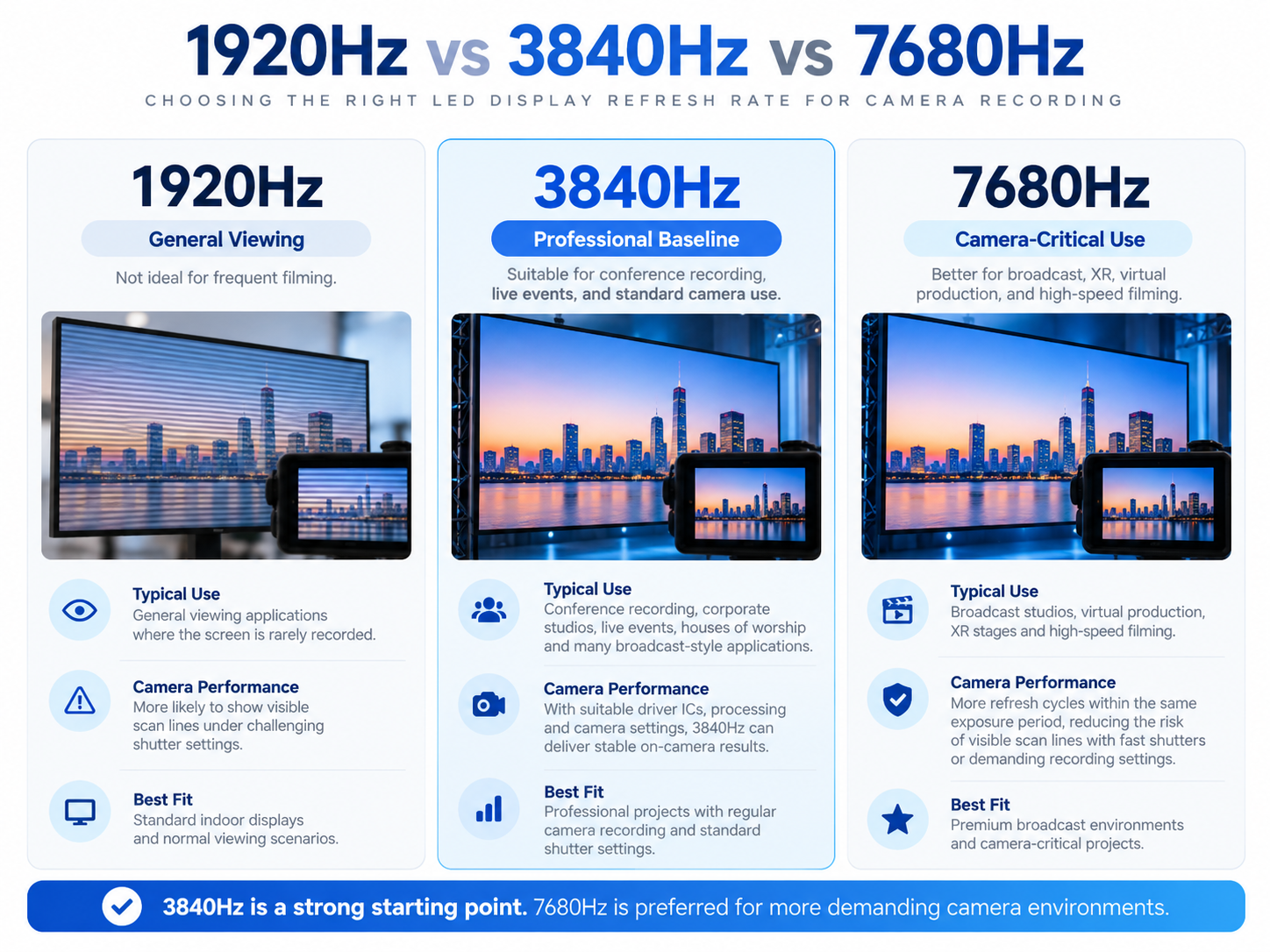
A 1920Hz LED display can be completely acceptable for many normal viewing applications, especially where the screen is rarely recorded. But for professional camera work, it provides less timing margin and is more likely to show visible scan lines under challenging shutter settings. If the LED screen will regularly appear in video, a higher refresh configuration is usually the safer choice.
3840Hz is widely used across modern indoor and commercial LED displays and is a strong baseline for conference recording, corporate studios, live events, houses of worship and many broadcast-style applications. With suitable driver ICs, processing and camera settings, 3840Hz can deliver stable on-camera results for standard frame rates and common shutter speeds.
7680Hz provides more refresh cycles within the same exposure period, which can reduce the risk of visible scan lines when cameras use fast shutters or demanding recording settings. It is commonly considered for virtual production, premium broadcast environments, XR stages and projects where the LED screen is a major part of the captured image. High refresh rate is especially useful when paired with low scan ratios, high-quality driver ICs and precise synchronization.
The shutter determines how long the camera sensor is exposed during each frame. If the exposure window does not align well with the LED PWM cycle, banding can still appear even on a high-refresh screen. This is why camera teams often test shutter speed or shutter angle together with the LED processor before recording.
Scan rate affects how quickly different groups of LEDs are driven. Lower scan ratios and better driver ICs generally provide more camera-friendly performance because a full image can be refreshed more cleanly. Two LED screens both labeled 3840Hz can therefore behave differently on camera.
For camera-critical environments, synchronization can be just as important as refresh rate. Professional LED processing systems can use genlock or camera-oriented timing tools to align the LED refresh cycle with the camera. This helps prevent rolling bars, frame blending and other timing artifacts that cannot always be solved simply by increasing the refresh-rate number.
Yes, 3840Hz is a strong professional baseline for many camera-recording applications. Final performance still depends on shutter settings, scan rate, driver IC and synchronization.
Does 7680Hz completely eliminate camera flicker?
No. A higher refresh rate reduces the risk of visible artifacts, but mismatched shutter timing, scan rate or synchronization can still create banding or rolling lines.
They are commonly caused by a timing mismatch between the camera exposure and the LED display refresh or PWM cycle. Processor synchronization and camera shutter adjustment are often required.
 Hot News
2026-10-08
2026-10-07
2026-08-07
2026-06-29
2026-06-10
2026-05-11
Caiyi LED Display Technology is a leading enterprise specializing in LED screens,driving Industry innovation with our patent mechanical led screen







305, Building 18, Advanced Energy Storage and Energy Saving Creative Demonstration Industrial Park, No. 169, Section 2, East Renmin Road, Changsha Economic and Technological Development Zone
Copyright © Caiyi Led Display Technology Co., Ltd. All Rights Reserved Privacy Policy Blog